
For private landlords
Add your flats in a conversation, not a wizard
Type or paste what you have, or photograph the lease. The AI assistant prepares drafts of properties and tenant invitations — you check and approve. Only what you approve is saved.
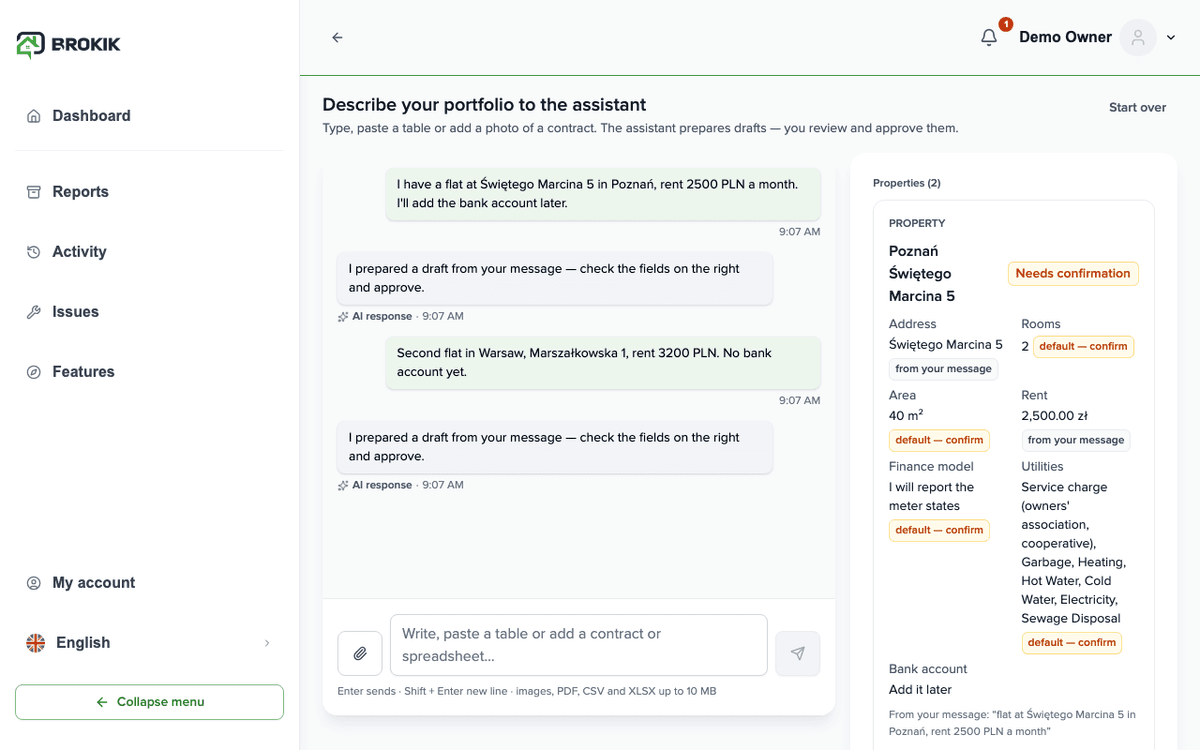
How it works in Brokik
Four screens from the first message to a flat on your list.You type, paste or add a photo of the lease
One message: “I have a flat at Świętego Marcina 5 in Poznań, rent 2500 zł”. Photos and PDFs up to 10 MB, up to 5 files.The assistant prepares drafts and asks for what is missing
Under every value you see where it came from. What was not in your message is never invented — the field is marked as missing and the assistant asks.You correct and approve
“Edit” opens the same fields and validation as the wizard. “Approve” works only once the draft is complete.The flat is in Brokik as if added by the wizard
An approved draft goes through the regular property wizard. The property is on your list; next you invite the tenant.
Scenario
The first half hour in Brokik with two flats
Landlord
- Describes both flats in one message and adds a photo of the Marszałkowska lease.
- Fills in the bank account the message did not contain and approves both drafts.
- Invites the tenant by e-mail — the assistant proposes the invitation; the agreement is created in the usual flow once accepted.
Tenant
Nothing to doReceives a regular e-mail invitation; the landlord's assistant has no access to the tenant's account.
Each of these steps is a feature available in Brokik today.
What the assistant never does
Four rules that hold on every account.
Never invents values
A field that was not in your data stays empty and marked as missing. Under every value you see its source.
Never saves without approval
A draft becomes a property, client or invitation only after your “Approve”, through the same wizard as manually.
No legal advice
Explains how something works in Brokik and where to find it. In disputes it refers you to the other party of the agreement.
Says it is an AI
The first message in the panel is a disclosure: you are talking to an AI assistant, not a Brokik employee.
AI creditsPrice includes VAT. Buy credits in the assistant panel (Usage) or in My account.1,000 credits usually cover about 50 answers; longer pastes cost more.
Assistant answers use credits; approving drafts is free. Plan credits are used first, then purchased ones.Limit: 60 messages a day per account.
In every plan
1,000 credits a month
From your first plan payment; unused credits don't carry over.Top-up
1,000 credits for £2.10
1 to 50 at a time, one-time payment. Purchased credits never expire.