
For property managers
Paste your unit list, approve your portfolio
Copy the rows from your spreadsheet: client, address, rent. The AI assistant turns them into drafts of owner-clients and units, flags gaps and saves the portfolio only after your “Approve all”.
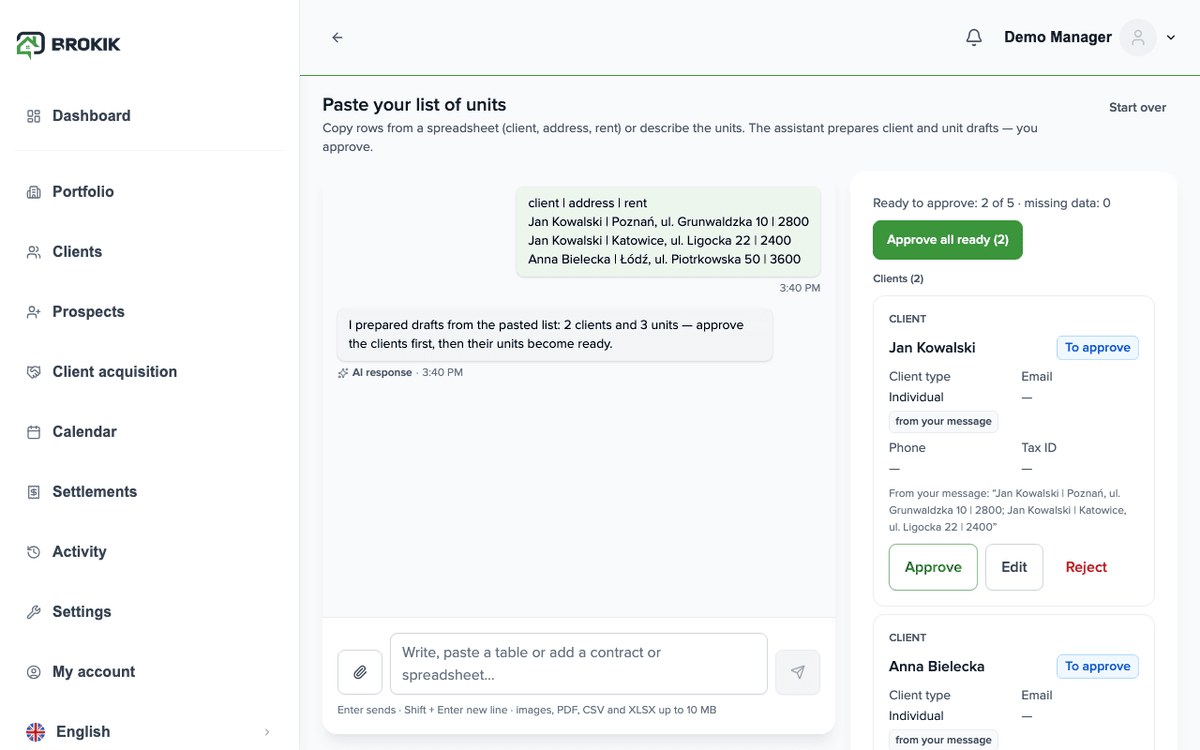
How it works in Brokik
From a spreadsheet to a portfolio in four screens.You paste the rows
Select the client · address · rent columns and paste. Up to 20 000 characters per message; a longer list goes in several turns.Clients and units become drafts
Every row becomes a draft; a unit draft waits until its owner-client is approved. The screen shows five drafts pasted from the spreadsheet.You approve all ready drafts
One button for all complete drafts. Drafts with gaps and waiting drafts stay on the list.You get a per-row report
Each draft is saved separately; the report says what went in and what did not — for example the plan's unit limit.
Scenario
An agency moves 58 units from a spreadsheet
Manager
- Pastes the rows in three turns; the assistant drafts 12 clients and 46 units.
- Completes 6 drafts with gaps (two companies' tax IDs, addresses without a number) and approves all ready ones.
- Reads the report: 42 saved, 2 stopped by the plan limit — changes the plan and approves the rest.
Owner
Nothing to doSees their units in the owner portal once invited; no account is needed for the client record to exist.
Each of these steps is a feature available in Brokik today.
What the assistant never does
Four rules that hold on every account.
Never invents values
A field that was not in your data stays empty and marked as missing. Under every value you see its source.
Never saves without approval
A draft becomes a property, client or invitation only after your “Approve”, through the same wizard as manually.
No legal advice
Explains how something works in Brokik and where to find it. In disputes it refers you to the other party of the agreement.
Says it is an AI
The first message in the panel is a disclosure: you are talking to an AI assistant, not a Brokik employee.
AI creditsPrice includes VAT. Buy credits in the assistant panel (Usage) or in My account.1,000 credits usually cover about 50 answers; longer pastes cost more.
Assistant answers use credits; approving drafts is free. Plan credits are used first, then purchased ones.Limit: 60 messages a day per account.
In every plan
1,000 credits a month
From your first plan payment; unused credits don't carry over.Top-up
1,000 credits for £2.10
1 to 50 at a time, one-time payment. Purchased credits never expire.